


ArchiBot Docs
Guides for workspaces, chat, API keys, billing, and support.
Pick the role or product area that matches your account to land on the right starting guide. These pages cover Console workspaces and standalone ArchiBot Chat with safe handoff rules for support.
I'm a Team admin Set up the account, invite members, and complete SSO + billing. I'm a Team member Launch workspaces, connect IDEs, and manage day-to-day work. I'm a Platform operator Tenant admin, workspace targets, and support-handoff rules. I'm a ArchiBot Chat user Use browser chat, API keys, artifacts, billing, and account activity.
Top guides
Customer admin setup Use Account Setup to confirm your team, invite members, submit SSO details, connect Git, check billing and the workspace target, and launch the first workspace. Customer Admin Create a workspace Connect Git (or start from a WebCentral WAR), work through the Workspace setup steps checklist, and create the workspace. Workspace Start Manage workspaces Use My Workspaces to find, start, stop, open, update, schedule, inspect and delete workspaces, and understand what a workspace link does. Daily Work Persistent environments and CI & Review Create long-lived shared environments, set up CI review routes, review merge events with QA evidence, merge in Console and promote the validated candidate. Review And Promotion Usage and analytics Read workspace runtime, managed AI and platform resource usage in ArchiBot Credits, compare members and workspaces, and set credit caps. Usage And Credits ArchiBot Chat getting started Find ArchiBot Chat in the Console, understand the layout, and learn what to check before your first conversation. ArchiBot Chat ArchiBot Chat API keys Create, copy, and revoke customer-bound generated API keys, and wire an external coworker tool to the public ArchiBot endpoint. API
All guides 43 in total
Start Here
- Welcome to ArchiBot Learn what ArchiBot Console is for, how first sign-in works, where you land, which guide covers each Console area, and what is safe to share.
- Sign-in, members and access roles Sign in with the right identity, read the Account access view, understand each Console role, and invite or approve team members.
- Console settings and accessibility Use Settings for your ArchiBot account (setup, Git access, integrations, API keys, CI and review, support, activity, billing, spending caps) and for this browser's language and appearance.
Team Admin Guides
- Customer admin setup Use Account Setup to confirm your team, invite members, submit SSO details, connect Git, check billing and the workspace target, and launch the first workspace.
- Console account activity Read the lifecycle history and notification log on your account so you can confirm what ISM has recorded and which messages were queued or sent.
Workspace Guides
- Create a workspace Connect Git (or start from a WebCentral WAR), work through the Workspace setup steps checklist, and create the workspace.
- Workspace presets Workspace presets are not a separate surface. /presets opens Create Workspace; repeat a known-good launch shape through the Create checklist and keep secrets out of anything you save.
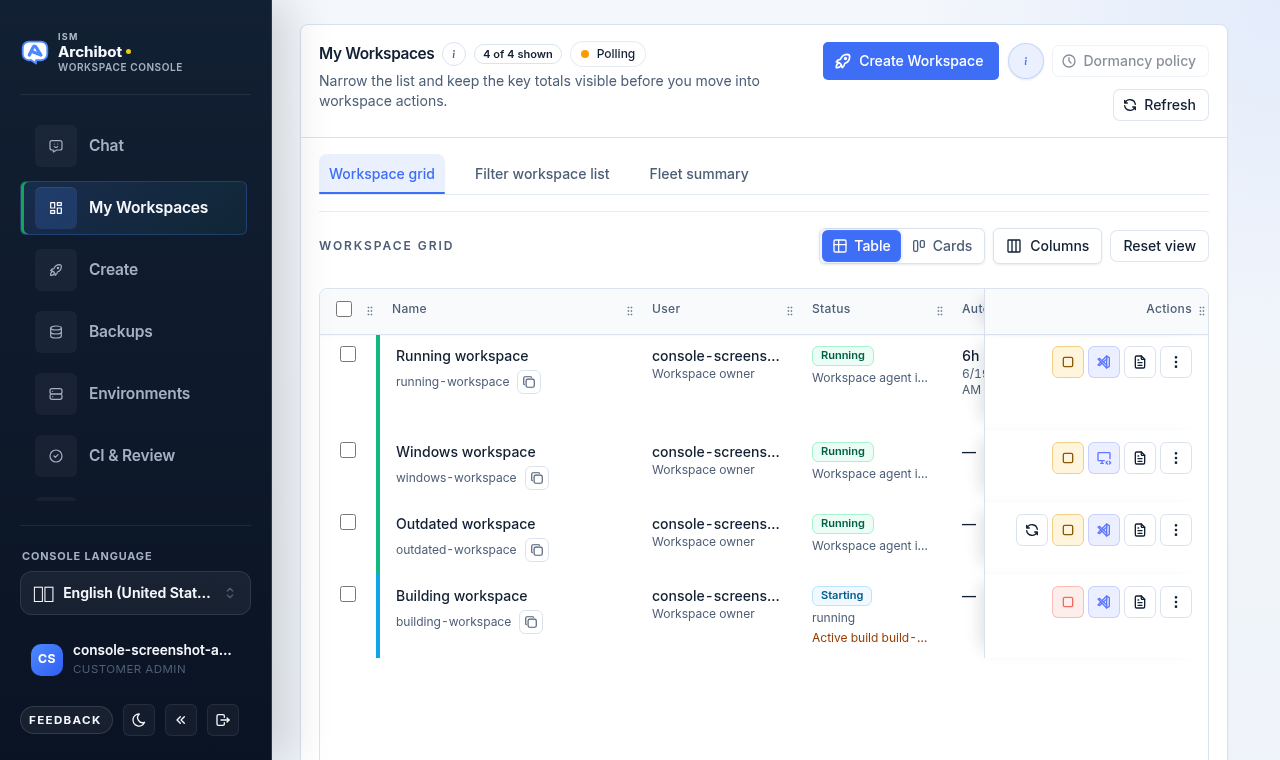
- Manage workspaces Use My Workspaces to find, start, stop, open, update, schedule, inspect and delete workspaces, and understand what a workspace link does.
- Open a workspace Open a running workspace from My Workspaces or from a workspace link, and fix a link that won't open.
- Backups and restore sources Use Backup Management to upload database backups, link them to repositories, and pick the restore source that Create uses for a new workspace.
- Work inside your workspace What you get inside a running workspace in code-server: the editor and its extensions, the Archibus app and database, logs, email testing, git, and where your files live.
- Use the ArchiBot VS Code extension Use ArchiBot in VS Code with a managed ArchiBot workspace, with a local Archibus folder, or with no folder open.
- Use the workspace bot Start ArchiBot inside code-server and put it to work: what it knows about your Archibus environment, what it can and can't do, ready-to-use prompts, and how it differs from Console chat.
- Workspace ArchiBot and Shared Drive Manage Shared Drive in Console across its six tabs (Drives, Files, Access, Backups, Capture, Memory), grant ArchiBot scoped access, request staged restores and create team drives.
Billing And Usage
- Product Catalog and readiness Use Product Catalog to confirm billing details, buy universal ArchiBot Credits, accept the terms, check out, and read orders, credit lots and balance activity.
- Usage and analytics Read workspace runtime, managed AI and platform resource usage in ArchiBot Credits, compare members and workspaces, and set credit caps.
- Billing Check a team's billing state, ArchiBot Credit balance, invoices and usage attribution, and know where to buy credits or get billing help.
Support
- Troubleshooting Triage sign-in, setup, Git, workspace creation, launch, logs, update, billing-readiness and phone issues from the Console workspace surfaces.
- Support handoff Open a sanitized support case from the Console Support tab, send quick notes with the global Feedback button, and keep secrets, one-time links, and account data out of every ticket.
- Sending feedback Use the global Feedback button to send a quick, structured note from any Console page. Pick a type and impact, add a subject and details, leave the page and account context attached, and keep the returned identifier for follow-up.
Review And Automation
- Design Use Design to turn a conversation into a brief, mockup directions and a reviewed implementation issue that goes to a workspace and then to CI & Review.
- Console Bots Shape bounded ArchiBot tasks in chat, review the task packet, and (for operators) set the bot policy, profiles and blueprints that decide when bots may run.
- Persistent environments and CI & Review Create long-lived shared environments, set up CI review routes, review merge events with QA evidence, merge in Console and promote the validated candidate.
- Operations center Use Operations to triage active CI, QA, bot and workspace work, review capacity alerts and, for operators, work the ArchiBot skill reviews queue.
Legal
- Privacy policy How ArchiBot collects, uses, shares, and protects personal information for Console, ArchiBot Chat, workspaces, support, and billing.
- End User License Agreement The baseline user terms for accessing ArchiBot Console, ArchiBot Chat, shared-hosted workspaces, managed AI routing, documentation, and related services.
Platform Operations
- Tenant admin for operators Use Access operations (/access) to choose a tenant and team, onboard the team, manage members and permissions, and attach workspace targets.
- Workspace Help for operators Use the operator Workspace Help chat to triage workspaces across the fleet, read sanitized runtime evidence, and draft user-safe handoffs.
- Billing Help for operators Use the operator-only Billing Help chat to inspect a customer's billing state, clear credit and verification blockers, and apply audited support credit.
ArchiBot Chat
- ArchiBot Chat getting started Find ArchiBot Chat in the Console, understand the layout, and learn what to check before your first conversation.
- ArchiBot Chat setup Open the ArchiBot account section of Settings and finish Setup: confirm access, choose your plan and intended use, set file, API, and notification posture, then save.
- Using ArchiBot Chat Start threads, combine context sources, attach files, save prompts, and read responses on the Chat screen.
- ArchiBot Chat artifacts Browse the files you upload and the files ArchiBot generates, preview details, attach to chat, and download or delete without touching raw storage paths.
- ArchiBot Chat API keys Create, copy, and revoke customer-bound generated API keys, and wire an external coworker tool to the public ArchiBot endpoint.
- ArchiBot Chat billing and credits Review the Universal Archibot Credit wallet used by Chat, generated API keys, workspaces, storage, bots, and CI, then open Product Catalog when you need more credits.
- ArchiBot Chat access and SSO Submit your identity provider details on the Single sign-on step so ISM can wire organization sign-in.
- ArchiBot Chat troubleshooting Diagnose common Chat, API key, billing, file upload, SSO, and Activity problems, then gather the right detail before you open a case.
- ArchiBot Chat activity and audit Review account lifecycle history and notifications from the Console Activity tab for supportable evidence without raw secrets.
- ArchiBot Chat approved data use Know what data is approved for hosted commercial ArchiBot Chat and when to request an enterprise review.
- ArchiBot Chat support cases Send an account-scoped support request from the Console and include useful evidence without exposing secrets.
- ArchiBot Chat security overview Review customer-visible security controls for access, credentials, credits, artifacts, audit, backups, and data boundaries.
- ArchiBot Chat subprocessors and service providers Understand service-provider categories used by hosted commercial ArchiBot Chat.